 |
| From chris' blog |
Saturday, December 10, 2011
HP82240A RedEye on Arduino Duemilanove
A long time ago I had played with my old HP 82240A printer, but unfortunately I somehow misplaced the software I wrote back then. So I re-wrote it, you can get it on github.
This time it's written for a Atmel AVR ATMEGA328P as used on the Arduino Duemilanove because this little board makes prototyping so very convenient.

Sunday, October 23, 2011
Synology Cubestation CS407 - Boot Log
Just for reference: Booting up a CS407, this is what you can see on the serial port (jumper block near the SATA connectors, 2=GND, 4=Tx, 6=Rx):
$ cu -l ttyUSB0 -s115200
Connected.

         __  __                      _ _
        |  \/  | __ _ _ ____   _____| | |
        | |\/| |/ _` | '__\ \ / / _ \ | |
        | |  | | (_| | |   \ V /  __/ | |
        |_|  |_|\__,_|_|    \_/ \___|_|_|
 _   _     ____              _
| | | |   | __ )  ___   ___ | |_
| | | |___|  _ \ / _ \ / _ \| __|
| |_| |___| |_) | (_) | (_) | |_
 \___/    |____/ \___/ \___/ \__|  ** LOADER **
 ** MARVELL BOARD: Synology Disk Station LE

U-Boot 1.1.1 (Jan 18 2007 - 12:01:00) Marvell version: 1.11.2

DRAM CS[0] base 0x00000000   size 128MB
DRAM Total size 128MB
[4096kB@ffc00000] Flash:  4 MB
Addresses 20M - 0M are saved for the U-Boot usage.
Mem malloc Initialization (20M - 16M): Done
*** Warning - bad CRC, using default environment


Soc: 88F5281 D0
CPU: ARM926 (Rev 0) running @ 500Mhz
Orion 2 streaming disabled
VFP initialized to Run Fast Mode.
SysClock = 166Mhz , TClock = 166Mhz


Model: CS-407
CPLD version: 0x0
FAN Status: Running

USB 0: host mode
CPU: Write allocate enabled
Net:   egiga0 [PRIME]
Press Ctrl+C to abort autoboot in 1 second
## Booting image at ffc00000 ...
   Image Name:   Linux-2.6.15
   Image Type:   ARM Linux Kernel Image (uncompressed)
   Data Size:    1450556 Bytes =  1.4 MB
   Load Address: 00008000
   Entry Point:  00008000
   Verifying Checksum ... OK
OK
## Loading Ramdisk Image at ffe00000 ...
   Image Name:   synology_88f5281_cs407 1354
   Image Type:   ARM Linux RAMDisk Image (gzip compressed)
   Data Size:    810453 Bytes = 791.5 kB
   Load Address: 00800000
   Entry Point:  00800000
   Verifying Checksum ... OK

Starting kernel ...

Uncompressing Linux............................................................................................. done, booting the kernel.
Linux version 2.6.15 (root@image15) (gcc version 3.4.3 (CSL 2005Q1B) (Marvell 2006Q3)) #1354 Sat Oct 23 01:49:30 CST 2010
CPU: ARM926EJ-Sid(wb) [41069260] revision 0 (ARMv5TEJ)
Machine: MV-88fxx81
Using UBoot passing parameters structure
Sys Clk = 166666667, Tclk = 166666667
Synology Hareware Version: DS407v10
Memory policy: ECC disabled, Data cache writeback
CPU0: D VIVT write-back cache
CPU0: I cache: 32768 bytes, associativity 1, 32 byte lines, 1024 sets
CPU0: D cache: 32768 bytes, associativity 4, 32 byte lines, 256 sets
Built 1 zonelists
Kernel command line: console=ttyS0,115200 ip=off initrd=0x00800040,4M root=/dev/md0 rw syno_hw_version=DS407v10
PID hash table entries: 1024 (order: 10, 16384 bytes)
Dentry cache hash table entries: 32768 (order: 5, 131072 bytes)
Inode-cache hash table entries: 16384 (order: 4, 65536 bytes)
Memory: 128MB = 128MB total
Memory: 122452KB available (2400K code, 594K data, 108K init)
Mount-cache hash table entries: 512
CPU: Testing write buffer coherency: ok
checking if image is initramfs...it isn't (no cpio magic); looks like an initrd
Freeing initrd memory: 4096K
NET: Registered protocol family 16

CPU Interface
-------------
SDRAM_CS0 ....base 00000000, size 128MB
SDRAM_CS1 ....disable
SDRAM_CS2 ....disable
SDRAM_CS3 ....disable
PEX0_MEM ....base e0000000, size 128MB
PEX0_IO ....base f2000000, size   1MB
PCI0_MEM ....base e8000000, size 128MB
PCI0_IO ....base f2100000, size   1MB
INTER_REGS ....base f1000000, size   1MB
DEVICE_CS0 ....base fa000000, size   2MB
DEVICE_CS1 ....base f8000000, size  32MB
DEVICE_CS2 ....base fa800000, size   1MB
DEV_BOOCS ....base ffc00000, size   4MB
Marvell USB EHCI Host controller #0: c0bf5c00
PCI: bus0: Fast back to back transfers disabled
PCI: bus1: Fast back to back transfers enabled
SCSI subsystem initialized
use IDMA acceleration in copy to/from user buffers. used channels 2 and 3
Done.
VFS: Disk quotas dquot_6.5.1
Dquot-cache hash table entries: 1024 (order 0, 4096 bytes)
Initializing Cryptographic API
io scheduler noop registered
io scheduler anticipatory registered
io scheduler deadline registered
io scheduler cfq registered
Serial: 8250/16550 driver $Revision: 1.3 $ 2 ports, IRQ sharing disabled
serial8250: ttyS0 at MMIO 0x0 (irq = 3) is a 16550A
serial8250: ttyS1 at MMIO 0x0 (irq = 4) is a 16550A
RAMDISK driver initialized: 16 RAM disks of 65536K size 1024 blocksize
loop: loaded (max 8 devices)
Marvell Gigabit Ethernet Driver 'egiga':
  o Ethernet descriptors in DRAM
  o DRAM SW cache-coherency
  o Checksum offload enabled
  o Loading network interface 'egiga0' as eth0
  o Radom MAC address 00:ef:af:c3:17:94

PCI: enabling device 0000:00:01.0 (0140 -> 0143)
Delay 10 seconds to wait for disk 0 ready.
Thunderbolt GPSDO PPS Signal
Years after I got my thunderbolt GPS controlled clock I finally managed to connect the precise pulse-per-second signal to my linux-based router and NTP-server.
 |
| From chris' blog |
 |
| From chris' blog |
 |
| From chris' blog |
Sunday, October 02, 2011
Fire-Basket
Getting rid of the remaining (small, not really useable for anything) pieces of wood left over from the garden-shed project.


(Update: Last pictures distorted by virtue of Microsoft Windows Live Writer ™ © ®…)
Wednesday, September 28, 2011
Garden-House almost finished...
After a looooooooooong time, my garden-shed project is nearing its completion.
 |
| From chris' blog |
 |
| From chris' blog |
Wednesday, August 24, 2011


Sunday, July 31, 2011

Friday, June 10, 2011
Behringer UB1002 Pre-Fader FX Modification
I have a small UB1002 mixer from Behringer connected to my computer, but one of the annoying things about this (otherwise very cost-effective and nice) device is that the built-in AUX/Effect bus is configured as post-fader only. And therefore I never had any use for it.
With a little soldering, I managed to convert it to pre-fader, which makes the FX output much more useful as a pre-listening or monitor channel.
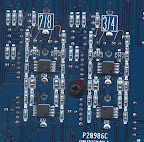
For the stereo-channels 3–10, you can just move one resistor each, solder it perpendicular to its normal location and add a jumper wire on the unconnected end of the resistor:
For the mono-channels, the resistor to the FX-summing-bus is integrated in a four-channel resistor array. Therefore I chose to cut the trace from the resistor pad to a via next to it (indicated with a red line in the picture), and add a resistor from the parts box (the ones soldered in a 45 degree angle to the pins of the FX-pot). I only found 4.7kΩ in my parts box, the resistor-pack nominally is 5.1kΩ:
 |
| From chris' blog |
 |
| From chris' blog |
 |
| From chris' blog |
Friday, June 03, 2011
Promise SmartStor NS4600 Serial Port Connector Pinout
I have problems with a Promise NS4600 which seems to suffer from corruptions of its flash memory. For debugging, it's useful to be able to access the NS4600's serial port.
For this you have to get to the PCB: Remove the single screw that locks the black right cover in place, then slide the cover to the front. With the cover removed, loosen the 5 screws that hold the PCB in place. Lift the PCB up. The connectors to the harddisk backplane and the LED/button part on the front should part easily.
The signals are on a 4pin connector marked CN11 (2mm spacing, not 1/10"!). As I didn't have a compatible plug, I just soldered a 4-pin cable to the bottom of the PCB that goes through the small void in the cutout for the SATA port.
 |
| From chris' blog |
 |
| From chris' blog |
The port uses 3.3V levels and runs at the usual 115200 bps. Promise has chosen to use the u-boot bootloader. This is how a normal powerup of the device looks, up to the point where the linux-kernel takes over (output continues, I just stopped pasting). I'm using a FT232RL breakout board as a 3.3V serial port, but any other should do.
$ !cu
cu -l ttyUSB0 -s115200
Connected.


U-Boot 1.3.3 (NS4600 - 021) (May 26 2009 - 11:16:20)

U-Boot code: FFF90000 -> FFFC8E17  data: 00070000 -> 00072993
        BSS: 00072994 -> 00088CDB stack: 00088CDC -> 00098CDB
     malloc: 00098CDC -> 000DCCDC
CPU Freq: 600 Mhz
FSB Freq: 400 Mhz
DRAM size: 256 MB
DRAM Configuration:
Bank #0: 00000000 256 MB
Bank #1: 10000000  0 kB
        00  01  8086  5023  0880  0b
        00  02  8086  5024  0604  0b
        02  00  105a  3f20  0104  0b
        00  03  8086  5025  0604  0b
        03  00  8086  5040  0200  0b
        03  01  8086  5044  0200  0f
        03  03  8086  503e  ff00  00
        03  07  8086  503c  1110  0b
        03  08  8086  503d  0680  0b
        03  09  8086  502c  0b40  0b
        03  0a  8086  503f  0880  0b
        03  0c  8086  5030  1101  0b
        00  04  8086  5037  0604  00
        00  0a  8086  5038  ff00  00
        00  1d  8086  5033  0c03  0b
        00  1d  8086  5035  0c03  0b
        00  1f  8086  5031  0601  00
        00  1f  8086  502b  0104  0f
        00  1f  8086  5032  0c05  0f
        00  1f  8086  5036  1101  07
In:    serial
Out:   serial
Err:   serial
I2C:   Ready
NAND:  128 MiB
Net:   e1000: 00:01:55:11:8a:76
1000 Mbs, Full Duplex
Valid link established!!!
GbE#0
Hit Ctrl + C to stop autoboot:  0

NAND read: device 0 offset 0xa20000, size 0x200000

Reading data from 0xc1f800 -- 100% complete.
 2097152 bytes read: OK

NAND read: device 0 offset 0xc20000, size 0x800000

Reading data from 0x141f800 -- 100% complete.
 8388608 bytes read: OK
## Booting kernel from Legacy Image at 01100000 ...
   Image Name:   linux
   Created:      2009-09-03   8:38:23 UTC
   Image Type:   Intel x86 Linux Kernel Image (uncompressed)
   Data Size:    2014136 Bytes =  1.9 MB
   Load Address: 00500000
   Entry Point:  00500040
   Verifying Checksum ... OK
   Loading Kernel Image ... OK
OK
## Loading init Ramdisk from Legacy Image at 01600000 ...
   Image Name:   02.01.0000.06
   Created:      2009-12-31   2:57:40 UTC
   Image Type:   Intel x86 Linux RAMDisk Image (gzip compressed)
   Data Size:    4792129 Bytes =  4.6 MB
   Load Address: 00900000
   Entry Point:  00900040
   Verifying Checksum ... OK
Using boot protocol version 2.05
Linux kernel version 2.6.20.21-4600 (root@johnny) #32 PREEMPT Mon Aug 31 17:15:48 CST 2009
Initial RAM disk at linear address 0x01600040, size 4792129 bytes
Kernel command line: "root=/dev/ram rw mtdparts=nand0:2048K(safe-k),8320K(safe-r),2048K(kernel),8192K(rootfs),16512K(usr),2048K(data),91776K(app) console=ttyS0,115200"
Loading bzImage at address 0x00100000 (2008504 bytes)

Starting kernel ...
Sunday, March 27, 2011
Harddisk woes
I'm currently debugging a problem with SATA harddrives in a NAS and there is a certain series of SAMSUNG drives that have a nasty data corruption problem.
In short, it means that you have to run a DOS(!) program to upgrade your harddisk firmware! The amount of workarounds and kludges to get this running on my main PC (with a rather picky BIOS) is really staggering.


Thursday, March 17, 2011
Radiation
These are old pictures from when we visited the AKR2 reactor at the university of Dresden in March 2009.


Friday, March 11, 2011
eBay and PayPal suck
tl;dr: Today I tried to pay via PayPal for the first time in my life, it’s broken and sucks really hard.
In principle there should be the possibility to pay “via paypal” using only your bankaccount or credit card, but if you try to, you find out that the system is completely broken.
First, it only reloaded endlessly when trying to switch from eBay to the paypal-page in the Opera Browser.
Then, using the Idiot’s Browser™, I finally was able to pay using my bank-acocunt. Or so I thought. Every attempt I made, using the bank-account or two credit cards was greeted with a different uninformative error message, and yes, I triple-checked everything and there was no typo involved (especially in the AMEX case).

It completely eludes me how such a horribly idiotic system could rise to be a major payment processor.
<end of rant>
Wednesday, January 05, 2011

Thursday, December 23, 2010


Wednesday, September 22, 2010
![IMG_1718[1]](https://blogger.googleusercontent.com/img/b/R29vZ2xl/AVvXsEixUrYItEwVrOE2k0Ipk8ydpqH2_uyeYjZggeVm1HZdXria0LshItGbWBrpU2m6aDauZkKbgfOB3nlIe2SoYSgaOeyXyWZNVBHAY_7hDOgi01fzxrO8ZCrswtgDHn56v0Qv7ktKKg/s1600-h/IMG_1718%5B1%5D%5B3%5D.jpg "IMG_1718[1]")
![IMG_1719[1]](https://blogger.googleusercontent.com/img/b/R29vZ2xl/AVvXsEhnMS1JnpmQ3moYluS5e5JVepibfrqwyl4GI8proK2lNYohyZA4GXY0-9f5HBy2jLbkKOpA5bnNCykJG2DbKlnjcvElKpQSDCpTO1Z8B8MFy9UNUK-M27T1f_8uziWebZj8x0lenA/s1600-h/IMG_1719%5B1%5D%5B3%5D.jpg "IMG_1719[1]")
![IMG_1720[1]](https://blogger.googleusercontent.com/img/b/R29vZ2xl/AVvXsEhDtWVpPZGhiCS3QULOF8n0TuKEcsyQly0R92HecRErQSKPKhj3Ky32Bgv1fPvWU6RKn60sYp8mjYmYwE6BbxTVFLYfaH_nGulfo0tmsu4vBxi9HhuQCfbZ1_HVLDDRggHas-5MGA/s1600-h/IMG_1720%5B1%5D%5B3%5D.jpg "IMG_1720[1]")
Wednesday, September 01, 2010


Wednesday, July 07, 2010

Saturday, June 26, 2010

Sunday, June 13, 2010
DVB Streaming…
dvblast is kind of neat… :-) Streaming 4 programmes (one DVB-T transponder/frequency) to a windows machine running 4 vlc decoders.

$ dvblast –c dvblast_746000000.conf –f 746000000 –b 8
$ cat dvblast_746000000.conf
# arte
arte:239.0.0.1:4008 1 2
# Phoenix
239.0.0.1:4009 1 3
# EinsPlus
239.0.0.1:4010 1 6
# Das_Erste
239.0.0.1:4011 1 32
The corresponding “channel.conf” can be found on the VDR Wiki.
Subscribe to:
Posts (Atom)